EDR (Endpoint Detection and Response) is a cybersecurity solution that monitors endpoints - such as desktops, laptops, and servers - and responds to threats targeting them. EDR solutions provide real-time visibility into endpoint activity, allowing organizations to detect and mitigate security incidents effectively.
For simplicity, we split the endpoint sensor into two components:
- Kernel driver: Runs in kernel space to monitor low-level activity such as process creation, file access, and network connections.
- User-mode agent: Communicates with the kernel driver and handles data processing and telemetry.
Production EDR products usually include additional services, local storage, policy enforcement, management, and backend components.
flowchart TB
    subgraph user["User space"]
        agent["AegisAgent.exe<br/>(user app)"]
    end
    subgraph kernel["Kernel space"]
        driver["AegisMon.sys<br/>(kernel driver)"]
    end
    agent -- "request (IOCTL)" --> driver
    driver -- "response (events)" --> agent
    os["OS activity<br/>(processes, files, network)"] -. "callbacks" .-> driver
By the end of this post, we’ll have a kernel driver that loads, creates a device, and answers a request from the user app.
Warning: We are loading a test-signed kernel driver. Unlike user-mode software, where a crash only terminates the affected process, a bug in kernel mode can bluescreen the entire system. Always perform kernel development on a virtual machine or a test box you’re willing to break, with test signing enabled:
bcdedit /set testsigning onThen reboot the machine.
We’ll build two binaries:
- AegisMon.sys: The kernel driver. It runs in kernel mode and handles incoming requests from the user-mode application.
- AegisAgent.exe: The user-mode agent. It opens a handle to the driver’s device, sends a request, and retrieves the response.
Source for this post is on GitHub, tagged
blog-01
The driver
A kernel driver’s entry point is DriverEntry - think of main in a user-mode application. Here is ours:
NTSTATUS
DriverEntry(PDRIVER_OBJECT DriverObject, PUNICODE_STRING RegistryPath)
{
    NTSTATUS status;

    UNREFERENCED_PARAMETER(RegistryPath);

    status = IoCreateDeviceSecure(DriverObject, 0, &g_DeviceName,
                                  FILE_DEVICE_UNKNOWN, FILE_DEVICE_SECURE_OPEN,
                                  FALSE, &SDDL_DEVOBJ_SYS_ALL_ADM_ALL,
                                  &g_DeviceClassGuid,
                                  &g_DeviceObject);
    if (!NT_SUCCESS(status)) {
        DbgPrint("[AegisMon] IoCreateDeviceSecure failed 0x%08X\n", status);
        return status;
    }

    status = IoCreateSymbolicLink(&g_SymLink, &g_DeviceName);
    if (!NT_SUCCESS(status)) {
        /* Unwind what we built so a failed load leaves nothing behind. */
        DbgPrint("[AegisMon] IoCreateSymbolicLink failed 0x%08X\n", status);
        IoDeleteDevice(g_DeviceObject);
        g_DeviceObject = NULL;
        return status;
    }

    /* The dispatch table is just function pointers indexed by IRP major code:
     * when an IRP of a given type arrives, the I/O manager calls our handler. */
    DriverObject->MajorFunction[IRP_MJ_CREATE]         = AegisCreateClose;
    DriverObject->MajorFunction[IRP_MJ_CLOSE]          = AegisCreateClose;
    DriverObject->MajorFunction[IRP_MJ_DEVICE_CONTROL] = AegisDeviceControl;
    DriverObject->DriverUnload                         = AegisUnload;

    DbgPrint("[AegisMon] loaded; channel ready\n");
    return STATUS_SUCCESS;
}
Under the Hood of DriverEntry
Once the driver is loaded, the kernel calls DriverEntry, passing in a pointer to the driver object and its registry configuration path:
DriverEntry(PDRIVER_OBJECT DriverObject, PUNICODE_STRING RegistryPath)
PDRIVER_OBJECT DriverObject is a pointer to the driver’s main kernel object, which represents the driver itself. It contains:
- Dispatch routines: An array of function pointers (
MajorFunction) for handling different types of I/O requests (create, read, write, device control, etc.). - Unload routine: A function pointer (
DriverUnload) for cleanup when the driver is unloaded. - Driver metadata: Information such as the driver’s name and its device list.
PUNICODE_STRING RegistryPath points to the registry location where the driver’s service configuration is stored, typically:
\Registry\Machine\System\CurrentControlSet\Services\AegisMon
We can read configuration values from there.
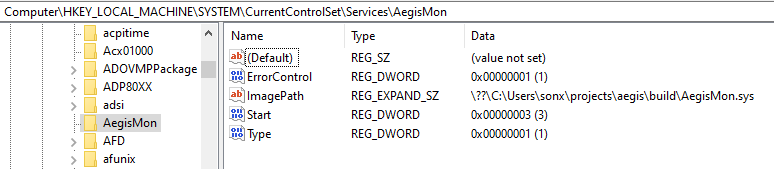
The service key the SCM creates for AegisMon. RegistryPath points here.
Creating the Device
A DEVICE_OBJECT is a communication endpoint the driver exposes to user space or other drivers. A single driver can create multiple device objects; the I/O Manager automatically links them into a list owned by the driver.
The usual function for allocating a device object is IoCreateDevice:
IoCreateDevice(DriverObject, 0, &g_DeviceName,
               FILE_DEVICE_UNKNOWN, FILE_DEVICE_SECURE_OPEN,
               FALSE, &g_DeviceObject);
That would create the communication endpoint we need, but it does not let this call specify the device’s security descriptor. For a named device object, IoCreateDevice is appropriate when its security policy is supplied elsewhere, typically by the driver’s INF.
Aegis currently installs itself as a service through a PowerShell script and has no INF-provided device security descriptor. Leaving access implicit would be a poor default for an EDR interface, as any process able to open the device could issue IOCTLs to it. We therefore use IoCreateDeviceSecure, which creates the same device object while letting us provide an explicit access policy:
#include <wdmsec.h>

static const GUID g_DeviceClassGuid = {
    0x4b4cc1a7, 0x6d5d, 0x4e62,
    { 0x9c, 0x3f, 0x42, 0xc7, 0xc3, 0xa8, 0x25, 0x6e }
};

IoCreateDeviceSecure(DriverObject, 0, &g_DeviceName,
                     FILE_DEVICE_UNKNOWN, FILE_DEVICE_SECURE_OPEN,
                     FALSE, &SDDL_DEVOBJ_SYS_ALL_ADM_ALL,
                     &g_DeviceClassGuid,
                     &g_DeviceObject);
Key parameters include:
0(DeviceExtensionSize): The size of the device extension structure. We don’t need any extra per-device context space here, so we pass0.&g_DeviceName: The device name, represented as aUNICODE_STRING. We name ours\Device\AegisMon.FILE_DEVICE_UNKNOWN: The device type. Since we are building a software-only monitor rather than driving physical hardware like a disk or keyboard, “unknown” is the correct choice.FILE_DEVICE_SECURE_OPEN: Applies the device’s security policy to opens within the device namespace. It does not create an ACL or secure the device by itself.&SDDL_DEVOBJ_SYS_ALL_ADM_ALL: A WDK-providedUNICODE_STRINGsecurity policy granting access to SYSTEM and Administrators. Restricting this interface is critical because any process that can open the device can execute its IOCTLs.&g_DeviceClassGuid: A private class GUID used to associate this device with its security policy. Microsoft warns drivers not to reuse a system-defined class GUID for this purpose.
Creating the Symbolic Link
IoCreateSymbolicLink(&g_SymLink, &g_DeviceName);
User-mode applications typically cannot open \Device\AegisMon directly through Win32 APIs because Win32 name resolution operates through the DOS device namespace. To expose a device to user mode, we use IoCreateSymbolicLink to create \??\AegisMon, which points to the native device object \Device\AegisMon.
Consequently, our device can be referenced in three ways depending on the context:
\Device\AegisMon: The native Object Manager path for the device.\??\AegisMon: The symbolic link in the user-accessible Object Manager namespace.\\.\AegisMon: The Win32 path passed toCreateFile. The\\.\prefix is Win32’s way of saying “look in the\??\namespace”, so it resolves to\??\AegisMon, which in turn points to\Device\AegisMon.
flowchart TD
    A["CreateFile('\\.\AegisMon')"] -->|"Win32 maps \\.\ to \??\"| B["\??\AegisMon<br/>(symbolic link)"]
    B -->|"object manager follows the link"| C["\Device\AegisMon<br/>(device object)"]
    C --> D["AegisMon.sys"]
They all resolve to the same underlying device object, which is why you will see the device referenced in these different ways depending on where you look in the codebase.
Using Sysinternals’ WinObj, you can see the device under \Device and the link under \GLOBAL??.
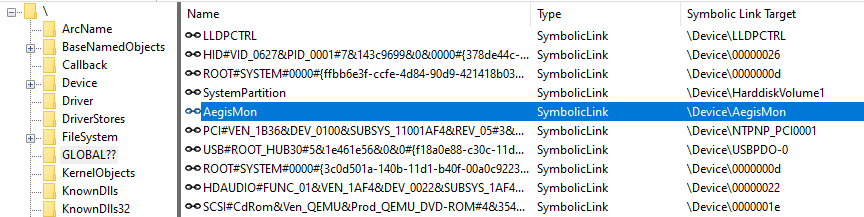
\GLOBAL??\AegisMon link pointing back to \Device\AegisMon
Dispatch Routines
DriverObject->MajorFunction[IRP_MJ_CREATE]         = AegisCreateClose;
DriverObject->MajorFunction[IRP_MJ_CLOSE]          = AegisCreateClose;
DriverObject->MajorFunction[IRP_MJ_DEVICE_CONTROL] = AegisDeviceControl;
DriverObject->DriverUnload                         = AegisUnload;
MajorFunction is an array of function pointers within the DRIVER_OBJECT structure, indexed by request type. Every I/O request directed to the driver is encapsulated in an IRP (I/O Request Packet), which contains a major function code indicating the operation:
IRP_MJ_CREATE: Invoked when user space opens a handle to the device.IRP_MJ_CLOSE: Invoked when user space closes the handle.IRP_MJ_DEVICE_CONTROL: Invoked when user space sends an I/O control code (IOCTL).
The I/O Manager looks up the entry in MajorFunction[code] and invokes our registered callback. Any unassigned slots default to a system-defined handler that returns STATUS_INVALID_DEVICE_REQUEST.
In short, these dispatch routines map specific I/O requests to our custom handlers:
- Open device handle ->
AegisCreateClose - Close device handle ->
AegisCreateClose - Send IOCTL ->
AegisDeviceControl
Opening the Device
static NTSTATUS
AegisCreateClose(PDEVICE_OBJECT DeviceObject, PIRP Irp)
{
    UNREFERENCED_PARAMETER(DeviceObject);
    Irp->IoStatus.Status = STATUS_SUCCESS;
    Irp->IoStatus.Information = 0;
    IoCompleteRequest(Irp, IO_NO_INCREMENT);
    return STATUS_SUCCESS;
}
When a user-mode application calls CreateFile("\\\\.\\AegisMon", ...), the I/O Manager constructs an IRP with the major function code IRP_MJ_CREATE and dispatches it to AegisCreateClose. Since this simple driver does not maintain per-handle state, we have no setup to perform. However, “nothing to do” still requires us to explicitly complete the request. We set the IRP status to STATUS_SUCCESS, call IoCompleteRequest to return control to the I/O Manager, and return STATUS_SUCCESS. Failing to complete an IRP will cause the calling application to hang forever.
Clean Up on Unload
We also need to define AegisUnload. When the driver is stopped, the OS calls this function. The driver must delete every symbolic link and device object it created before unloading. Failing to do so leaks resources and can leave names that conflict with a later load.
static VOID
AegisUnload(PDRIVER_OBJECT DriverObject)
{
    UNREFERENCED_PARAMETER(DriverObject);

    /* Tear down in reverse order of creation. */
    IoDeleteSymbolicLink(&g_SymLink);
    if (g_DeviceObject != NULL) {
        IoDeleteDevice(g_DeviceObject);
        g_DeviceObject = NULL;
    }
    DbgPrint("[AegisMon] unloaded\n");
}
The IOCTL
Opening the device proves we can reach the driver. Now we need to communicate with it, which we do by sending I/O Control Codes (IOCTLs).
#define IOCTL_AEGIS_GET_EVENTS \
    CTL_CODE(FILE_DEVICE_UNKNOWN, 0x800, METHOD_BUFFERED, FILE_READ_DATA)
common/AegisDriverProtocol.h L27–L28
CTL_CODE packs four parameters into a single 32-bit value:
| Field | Value | Meaning |
|---|---|---|
| Device type | FILE_DEVICE_UNKNOWN | Matches the device type we created |
| Function | 0x800 | Our command number. Values 0x800 through 0xFFF are reserved for vendor-defined functions |
| Method | METHOD_BUFFERED | Determines how buffer memory is transferred between user and kernel space |
| Access | FILE_READ_DATA | The access rights required on the handle (e.g., read access) |
The buffer transfer method determines how memory crosses the user-kernel boundary. METHOD_BUFFERED is convenient for small request and response payloads: the I/O Manager allocates a temporary kernel buffer (SystemBuffer). For input, it copies the user’s data there. For output, we write to SystemBuffer, and the I/O Manager copies it back when the request completes.
Here is how we handle this IOCTL:
static NTSTATUS
AegisDeviceControl(PDEVICE_OBJECT DeviceObject, PIRP Irp)
{
    PIO_STACK_LOCATION stack = IoGetCurrentIrpStackLocation(Irp);
    NTSTATUS status = STATUS_INVALID_DEVICE_REQUEST;
    ULONG_PTR info = 0;

    UNREFERENCED_PARAMETER(DeviceObject);

    if (stack->Parameters.DeviceIoControl.IoControlCode == IOCTL_AEGIS_GET_EVENTS) {
        ULONG outLen = stack->Parameters.DeviceIoControl.OutputBufferLength;
        if (outLen >= sizeof(g_Greeting)) {
            RtlCopyMemory(Irp->AssociatedIrp.SystemBuffer, g_Greeting, sizeof(g_Greeting));
            info = sizeof(g_Greeting);
            status = STATUS_SUCCESS;
        } else {
            status = STATUS_BUFFER_TOO_SMALL;
        }
    }

    Irp->IoStatus.Status = status;
    Irp->IoStatus.Information = info;
    IoCompleteRequest(Irp, IO_NO_INCREMENT);
    return status;
}
The first step is retrieving the current I/O stack location:
PIO_STACK_LOCATION stack = IoGetCurrentIrpStackLocation(Irp);
Because an IRP can travel down a stack of device objects (e.g., through filter drivers), each device in the chain gets its own parameters stored in an IO_STACK_LOCATION structure. This function retrieves the parameters for our level in the stack, where we can inspect the control code and the user’s buffer sizes:
stack->Parameters.DeviceIoControl.IoControlCode
stack->Parameters.DeviceIoControl.OutputBufferLength
We verify that the control code matches IOCTL_AEGIS_GET_EVENTS, ensure the caller’s output buffer is large enough to hold our response, and copy the greeting string.
Finally, we set the number of bytes to copy back:
Irp->IoStatus.Information = info; /* bytes copied back to user mode */
The Information field tells the I/O Manager how many bytes of SystemBuffer should actually be copied back to the user-mode buffer. If you forget to set this, the calling application will receive a success code but will read an empty buffer.
Here is the complete sequence of the request-reply cycle:
sequenceDiagram
    participant A as AegisAgent.exe
    participant IO as I/O Manager
    participant D as AegisMon.sys
    A->>IO: DeviceIoControl(IOCTL_AEGIS_GET_EVENTS)
    IO->>D: IRP (IRP_MJ_DEVICE_CONTROL)
    D->>D: Copy greeting into SystemBuffer
    D->>IO: IoCompleteRequest (status + Information)
    IO->>A: Copy SystemBuffer back, return bytes
The Agent
int main(void)
{
    HANDLE h = CreateFileA(AEGIS_USERMODE_PATH, GENERIC_READ, 0, NULL,
                           OPEN_EXISTING, 0, NULL);
    if (h == INVALID_HANDLE_VALUE) {
        fprintf(stderr, "Cannot open %s (error %lu). Is AegisMon loaded, "
                        "and are you running elevated?\n",
                AEGIS_USERMODE_PATH, GetLastError());
        return 1;
    }

    char buf[256];
    DWORD returned = 0;
    BOOL ok = DeviceIoControl(h, IOCTL_AEGIS_GET_EVENTS, NULL, 0,
                              buf, sizeof(buf), &returned, NULL);
    if (!ok) {
        fprintf(stderr, "DeviceIoControl failed (error %lu)\n", GetLastError());
        CloseHandle(h);
        return 1;
    }

    printf("driver says: %s (%lu bytes)\n", buf, returned);

    CloseHandle(h);
    return 0;
}
CreateFileA opens a handle to AEGIS_USERMODE_PATH (which is defined as "\\.\AegisMon", the Win32 path pointing to our symbolic link).
DeviceIoControl transmits the IOCTL_AEGIS_GET_EVENTS control code, passing a 256-byte output buffer to receive the driver’s response. The driver copies "hello from kernel" into this buffer and returns the number of written bytes in returned.
Loading and Running the Driver
After compiling the project using build.cmd, load the driver from an elevated PowerShell console. The script install.ps1 adds the test certificate to the system’s trusted store and registers the driver as a service with the Service Control Manager (SCM).
Note that registering a driver and running it are distinct operations: sc create writes the service configuration to the registry, whereas sc start actually loads the driver image into kernel memory and executes DriverEntry.
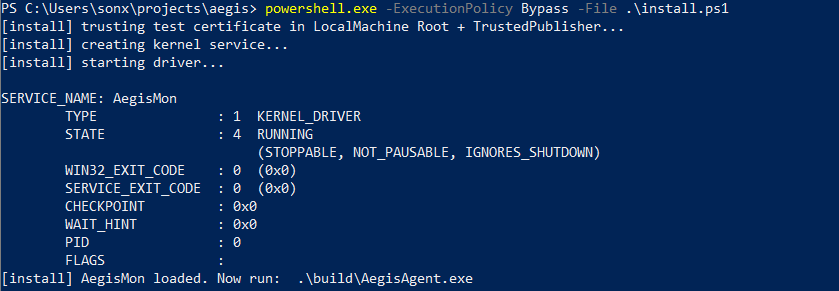
install.ps1 creating and starting the AegisMon kernel service.
Since there is no standard console in kernel space, we use DbgPrint instead of printf. To view these logs, we can use Sysinternals’ DebugView, configured to capture kernel-mode messages.
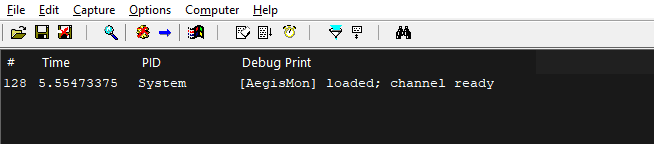
DebugView capturing [AegisMon] loaded; channel ready as the driver loads.
Now, when you execute the agent:
driver says: hello from kernel (18 bytes)
This represents 18 bytes (17 characters plus the terminating null byte) that started life as a kernel-mode string literal and successfully made the round trip into a user-mode console.

AegisAgent.exe opening the device and printing the driver’s reply.
Conclusion
In this post we built a simple kernel driver that creates a device and answers IOCTLs from user mode. This is the basic communication channel of an EDR: it lets the user-mode agent send commands to, and receive data from, the kernel driver. It does nothing useful yet, but it does everything that matters - a driver that loads cleanly, exposes a device user mode can find, routes requests through a dispatch table, and answers them.
In the next post we make the telemetry real. The driver will register for process creation and exit notifications, and instead of a static string, the IOCTL will start returning a stream of what actually just happened on the machine - which is where this finally starts to look like an EDR.